
Analysis Center2015 - Download
You'll be able to download in few seconds.
Publisher Description
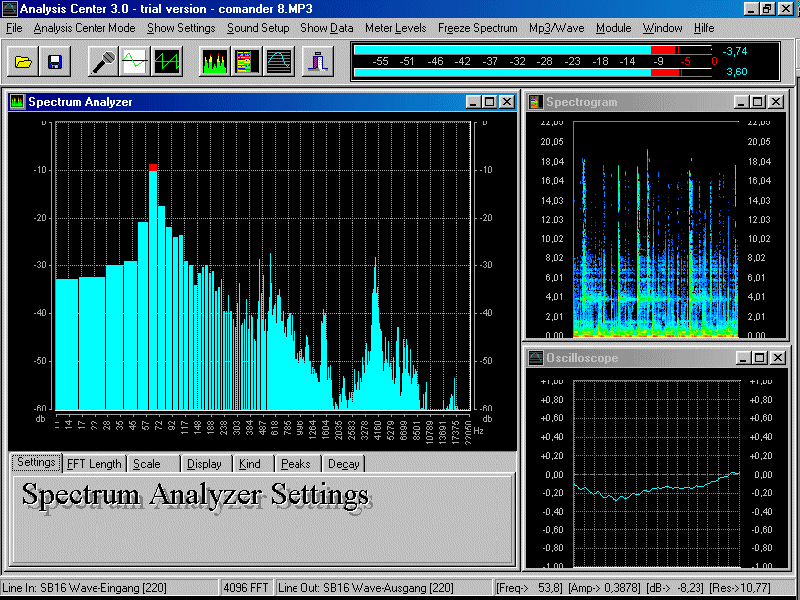
This sophisticated piece of software turns your computer into a modern, State of The Art spectrum analyzer giving you features that go far beyond the possibilities of any stand-alone hardware unit.An important advantage of your new analyzer software is the fact that your computer monitor is a far better means of displaying analyzer measurments than any LED or LCD bar. By making use of standard computer operations your analyzer software will store your personal settings or analyze audio data you may have previously recorded. What we had in mind while developing the PAS Analyzer was maximum flexibility, so we decided to equip it with its own test tone oscillator.While the analyzer is connected to your soundcards input the oscillator signal is feeding the outputs. Of course there is more than a 1 khz sine wave in the oscillator, its actually giving you various waveforms and noise. In Compare Mode the output of your soundcard is constantly being checked against whats coming in at the cards input sockets allowing you to evaluate the quality of any given signal chain. Now let me give you some real life examples for the use of the PAS Analyzer Detecting and eliminating room modes sound reinforcement
About Analysis Center
This Mathematics program is available in English. It was last updated on 29 September, 2026. Analysis Center is compatible with the following operating systems: Windows.
The company that develops Analysis Center is PAS-Products. The latest version released by its developer is 2015.
The download we have available for Analysis Center has a file size of 2.1 MB. Just click the green Download button above to start the downloading process. The program is listed on our website since 2015-03-19 and was downloaded 0 times. We have already checked if the download link is safe, however for your own protection we recommend that you scan the downloaded software with your antivirus. Your antivirus may detect the Analysis Center as malware if the download link is broken.
How to install Analysis Center on your Windows device:
- Click on the Download button on our website. This will start the download from the website of the developer.
- Once the Analysis Center is downloaded click on it to start the setup process (assuming you are on a desktop computer).
- When the installation is finished you should be able to see and run the program.
Program Details
System requirements
Download information
Pricing
Version History
version 2015
posted on 2015-03-19
Logarithmic amplitude scaler: -60dB
Disclaimer
External Download
We do not host Analysis Center on our servers. We did not scan it for viruses, adware, spyware or other type of malware. This app is hosted by the software publisher and passed their terms and conditions to be listed there. We recommend caution when installing it.
The external download link for Analysis Center is provided to you by apps112.com without any warranties, representations or guarantees of any kind, so access it at your own risk.
If you have questions regarding this particular app contact the publisher directly. For questions about the functionalities of apps112.com contact us.
